πŸš€ Powered by Google Gemini

Create GitHub Issues
Like a Pro

Stop writing vague bug reports. IssueMaker captures screenshots, logs, and context automatically β€” then uses AI to craft perfect issues in seconds.

10x Faster Issue Creation
AI Powered Drafting
1-Click Screenshot Capture
github.com/your-repo/issues/new
πŸ› bug
⚑ priority

Button click handler fails on mobile viewport

πŸ“Έ Screenshot attached πŸ“‹ Console logs captured 🌐 Environment info included
See It In Action

From Bug to Issue
In Seconds

Capture, annotate, generate with AI, and submit β€” all in one seamless flow.

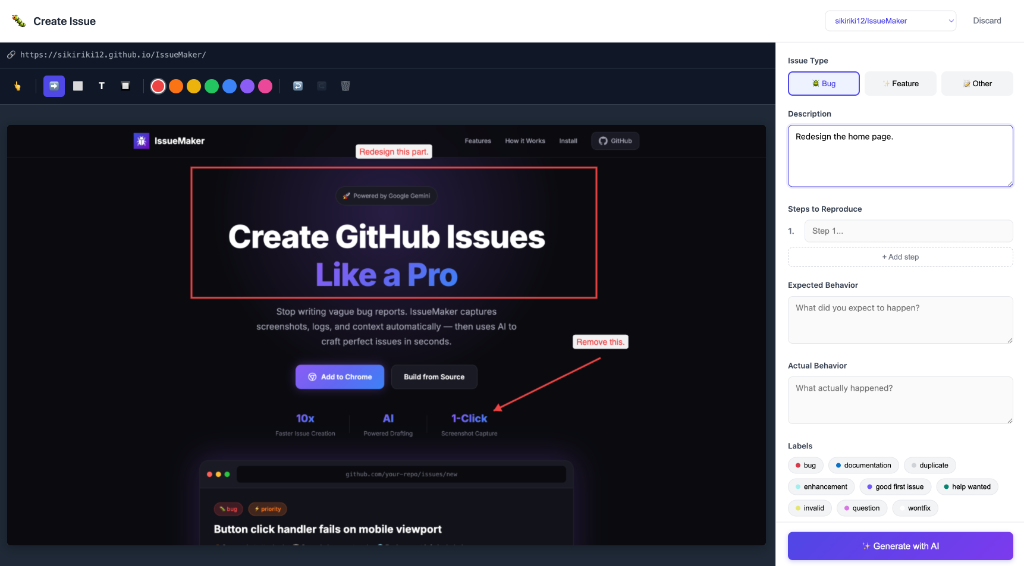
IssueMaker Editor - Capture screenshots and annotate with arrows, text, and blur tools
Step 1: Capture a screenshot, annotate with arrows, rectangles, and blur tools. Add your description and select labels.
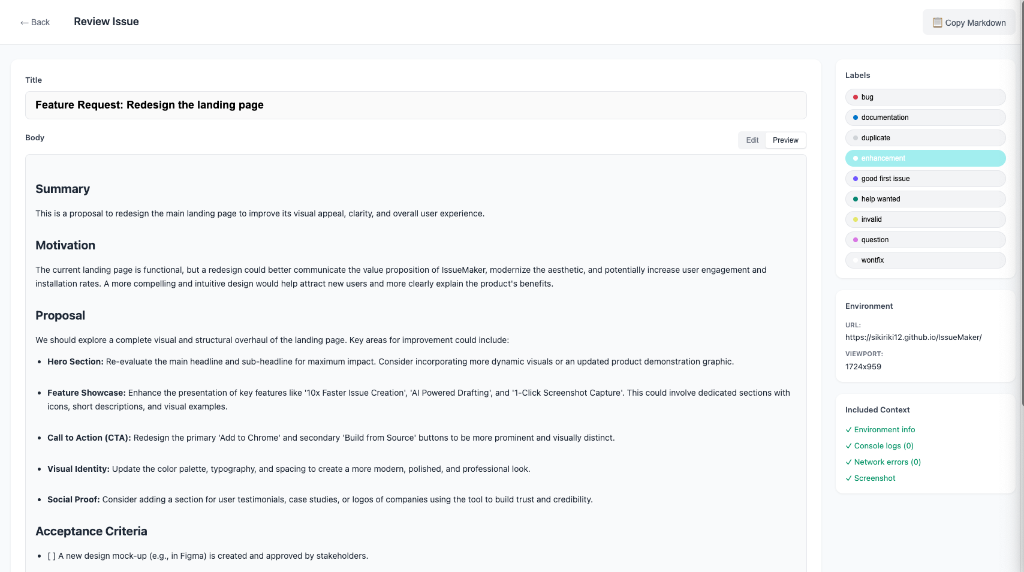
IssueMaker Review - AI-generated issue with proper formatting
Step 2: AI generates a well-structured issue with summary, motivation, proposal, and acceptance criteria. Review, edit, and submit!
Features

Everything You Need for
Perfect Bug Reports

A complete toolkit designed to save developers hours of documentation work.

πŸ€–

AI-Powered Drafting

Gemini analyzes your screenshot, description, and captured context to generate well-structured issue titles and bodies with proper formatting.

πŸ“Έ

Screenshot Capture

One-click screenshot of the current tab. No need to switch to external tools or manually crop images.

✏️

Annotation Tools

Draw arrows, rectangles, add text labels, and blur sensitive information. Full color palette included.

πŸ”

Context Capture

Automatically collects console logs, network errors, browser info, and viewport dimensions.

🏷️

Smart Labels

Fetches labels directly from your repository. Select and apply them without leaving the extension.

πŸ“

Review & Edit

Preview mode with full Markdown support. Edit and refine the AI-generated content before publishing.

⚑

Quick Access

Right-click any page or use βŒ₯+Shift+I to instantly open IssueMaker. No hunting through menus.

Workflow

From Bug to Issue
in 60 Seconds

A streamlined workflow that eliminates the friction of bug reporting.

1

Spot a Bug

Found something broken? Right-click the page, use βŒ₯+Shift+I, or click the toolbar icon.

πŸ›
2

Capture & Annotate

Screenshot is captured automatically. Draw arrows, highlight areas, and add notes.

✏️
3

Describe the Issue

Add a quick description. Context like console logs and environment info is already captured.

πŸ’¬
4

Generate with AI

Click one button. Gemini analyzes everything and drafts a professional issue.

πŸ€–
5

Review & Submit

Edit if needed, select labels, and create the issue directly on GitHub.

πŸš€
Get Started

Install in
Under a Minute

Free and open source. Works with any GitHub repository.

Install from Chrome Web Store

The easiest way to get IssueMaker β€” one click and you're ready.

Add to Chrome β€” Free
or build from source
1

Clone & Build

git clone https://github.com/sikiriki12/IssueMaker.git cd IssueMaker && npm install && npm run build
2

Load in Chrome

Go to chrome://extensions, enable Developer Mode, click "Load unpacked", and select the IssueMaker folder.

3

Configure

Add your GitHub token and Gemini API key in the extension options. That's it β€” you're ready to go!

Ready to Transform Your Bug Reporting?

Join developers who save hours every week with AI-powered issue creation.

Get IssueMaker on GitHub

Check Out Klip

πŸŽ™οΈ

Klip

AI-powered voice transcription for macOS. Record voice notes, meetings, or dictate textβ€”then get instant, accurate transcriptions with a single click.